Apache SVN - Repository Data Model
Internals of the SVN Repository layer

Overview
The preceding article gave an overview of the SVN 3-Tier Architecture. While this gives us an overview of what are the different components of SVN and what are their responsibilities, it didn’t touch upon how SVN internally stores the data of files, directories and revisions. This article will dive deeper into how SVN’s data model works so we can get a better understanding of how SVN may be doing its operations like commit, merge, diff etc and what drives the difference in performance characteristics between SVN and Git.
Building Blocks of SVN Internal Data Structure
This section will cover the basic data structure that SVN uses to model its data. SVN operations use these data structures in some combination to achieve their tasks so it’s important to understand these data structures both in an isolated fashion, and their links with each other.
Node
A node is the container of the actual data of a repository. This means the file contents or directory contents are represented as nodes. That’s right, nodes can be be of two types, file nodes and directory nodes. Let’s understand them a little better
File Nodes
File nodes represent files checked in to SVN
A file node consists of 2 main components internally
a byte string representing the actual file content
a property list containing key-value pairs holding metadata about the file like mime type etc.
Directory Nodes
directory nodes contain a list of directory entries where each directory entry contains
a name
a property list
a node
there is also a property list for the directory node itself apart from the ones for the directory entries
since each directory entry contains nodes, this leads to a recursive tree like structure which is expected from a directory. on the contrary, file nodes can’t have any children as there are no node references in a file node
Node Table
A node table is nothing but a map of node numbers to nodes. Node numbers are positive integers that uniquely identify a node.
Revision
A revision is just a number that also holds a pointer to a node number. If a revision “x” points to a node number “y”, the node and all the child nodes under it are said to belong to revision “x”. In SVN, revisions are monotonically increasing numbers.
A revision also has a property list to hold metadata about the revision like commit message etc.
History
A history is a list of revisions. It is internally represented as an array of revisions numbers
Repository Layout
With the above building blocks defined, we can now define how a repository is setup. If we want to reason about it, what all do we need?
we need something to store the directory tree at a point. well, we already have that in the form of directory and file nodes. they can represent our directory tree effectively and we have the node table to help provide an easy access to any node including the root of the directory.
we need the ability to version the directory tree so that we can move backward or forward in time and view our repository at different points. what if we can create a new copy of the full directory tree and assign the root directory some revision number. then we can just store these revisions in our history array and have a setup where we can easily answer the question : hey, what did the repository look like in this revision?
The below image uses the history array, the node table and nodes to represent the above thought process schematically. Note that when referring to revision 1, you have an access to node number 1 which points to an actual, logical node, which in this case, is a root directory. So with revision 1, you have access to the whole directory at that point of time.
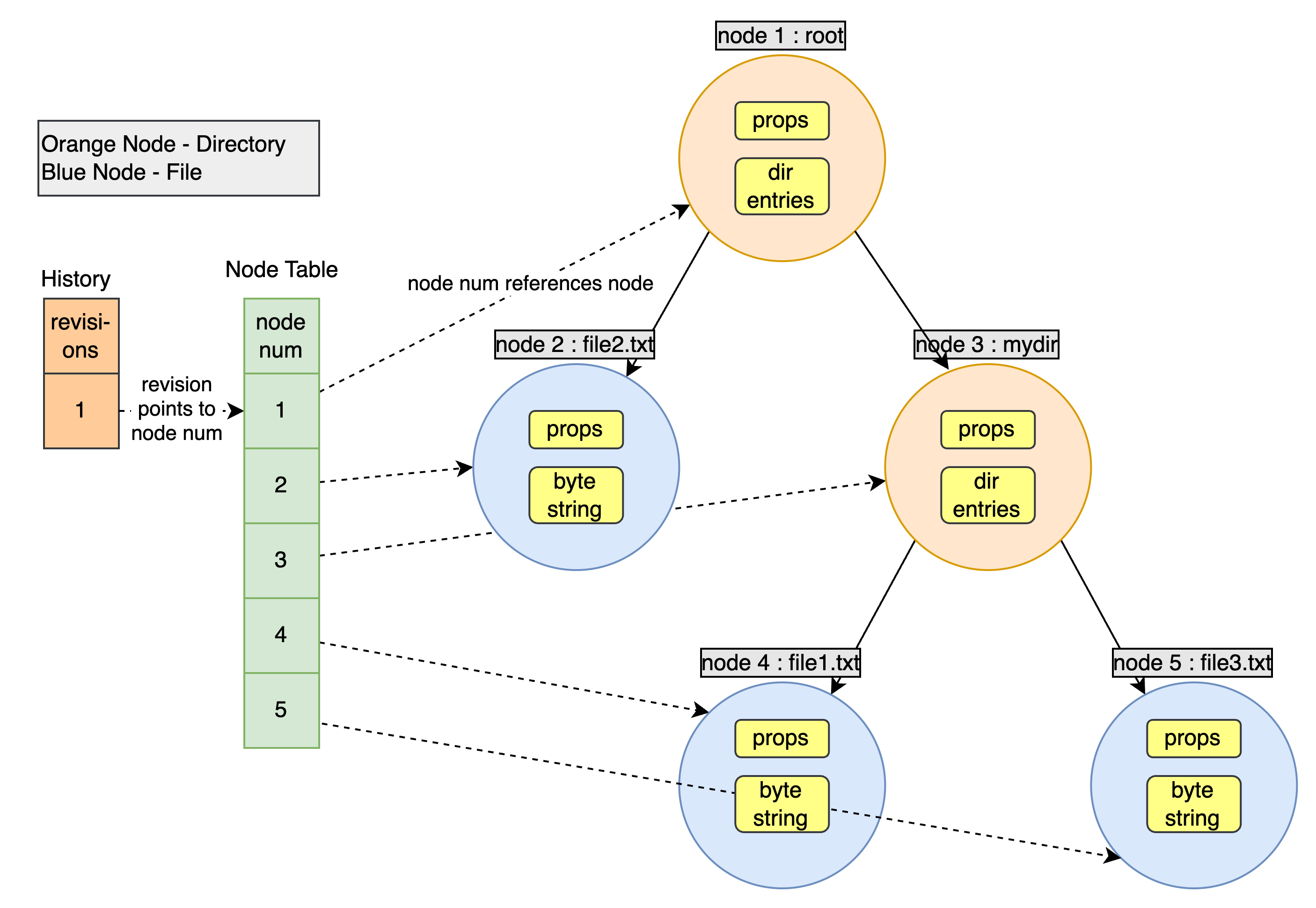
While the above is a simple to understand representation of the SVN data model, it leaves us with a problem. If we copy the whole directory tree every time, we create a lot of unneeded nodes that take up space. e.g. in the above scenario, if we change file3, and we end up copying the whole directory tree which leads to inefficiencies in both storage and data transfer operations
How can we solve this? Let’s go back and think about what our directory nodes can have. They can have a list of directory entries, where each entry is a file or directory node. Let’s say we have a directory which contains 2 files, A and B. Now if we change B, we definitely can’t use the existing B node as its contents are no longer valid, but what about A? Can we still use that node? Why not, let’s go ahead and reuse the unchanged nodes in the new directory nodes. Here’s what this looks like
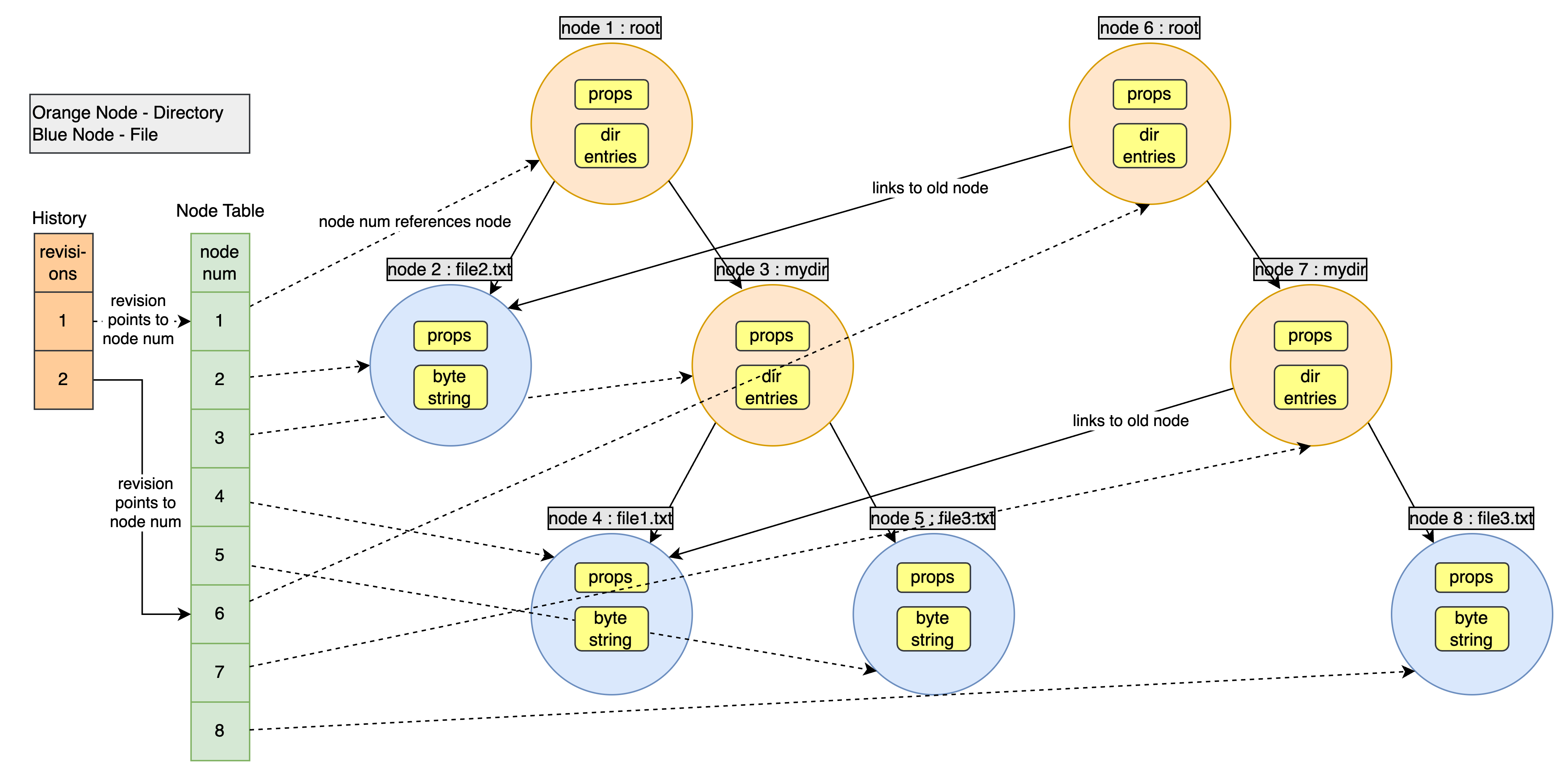
💡 In case you are wondering why did we create new nodes for mydir (node 3) and root (node 1), since we have changed file3.txt, we’ll create a new node with the updated contents of this file. Now since the node representing the file has changed, the directory containing the node will also change. Why? Remember the data inside a directory node? It’s a list of directory entries and a directory entry contains a reference to a node, i.e. a node number. So, since the node changed, hence the node number in the containing directory must change. This means we need a new directory node as well to represent this changed state. This change will bubble up right to the root directory due to the same reasons.
With this, we can eliminate the need to have duplicate nodes and reuse old, unchanged nodes as is.
Storing Diffs
So we now have a functional data model that can store our directory tree and also version it. But we haven’t addressed one question? How does SVN manage diffs? Does it really store the old and new node contents independently like in the above diagrams? The answer is……wait for it….NO!
The above model with different versions of files being stored independently is closer to what git does. With SVN, the older content of a file is actually deleted. So how do we go from current version to older one? We store the diffs and apply them in a reverse order from our current state to reach an older state. So, with SVN, if we want to see a file two revisions before its current state, SVN will internally un-apply the diffs that led to the last two revisions to render the required revision of the file.
💡 A diff is internally represented as a data structure as well. We won’t go too much into it but at a high level, it is represented as a recursive data structure with each level telling the diff to some node of the directory tree and the underlying levels telling the diff to the underlying levels of the directory tree. You can read more about it in the referenced articles.
Here’s an updated diagram with the diffs accounted for.
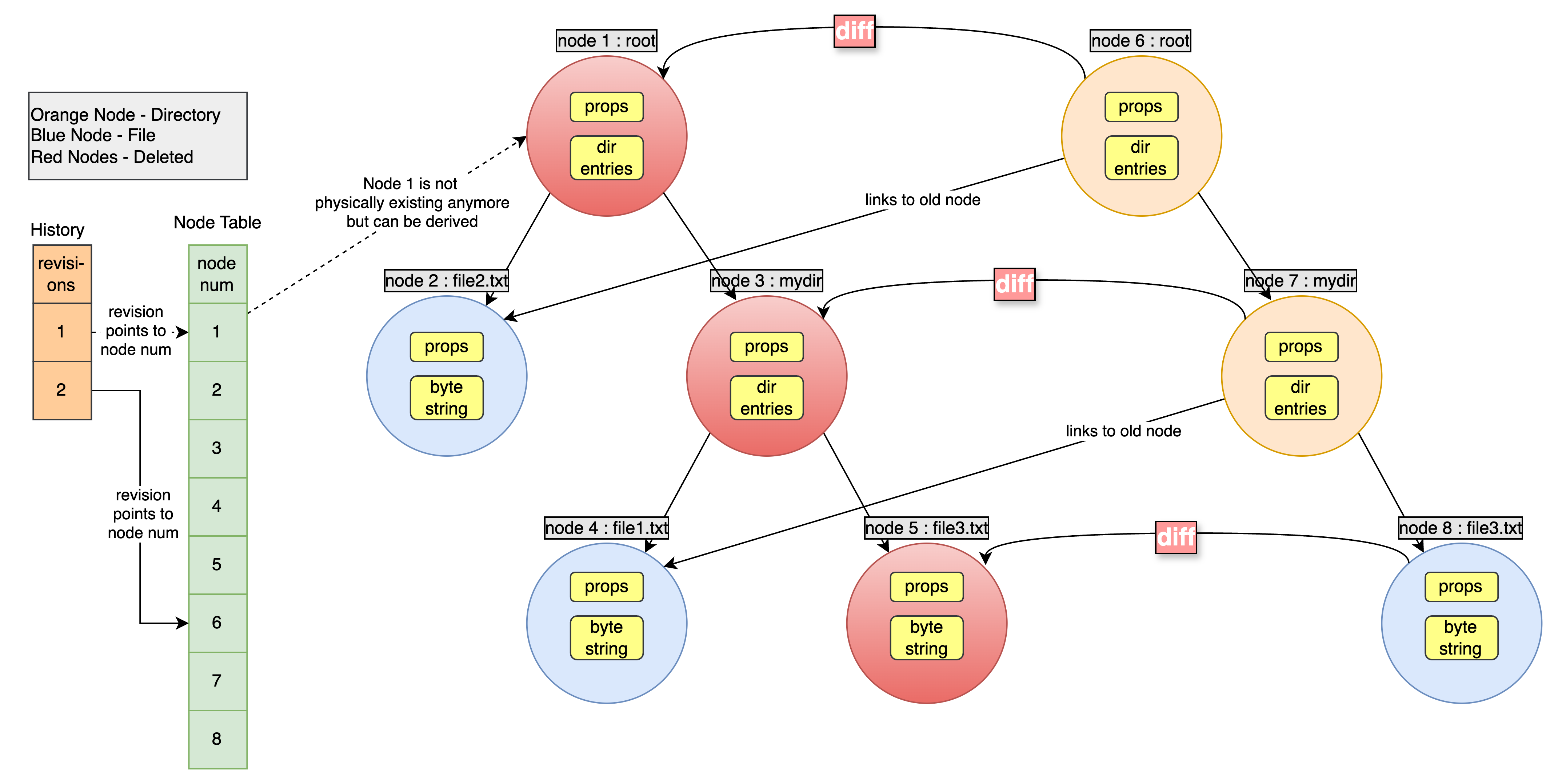
With this, you now hopefully have a functional understanding of how SVN models its data. The reference 1 below has a great example of how a new commit creates new nodes and revisions in a step by step manner. Do give it a read. This will conclude the SVN set of articles in the VCS series. Stay tuned for the next set of articles on Git.
In case you scrolled down here without reading, here’s a TLDR meme to summarise it all